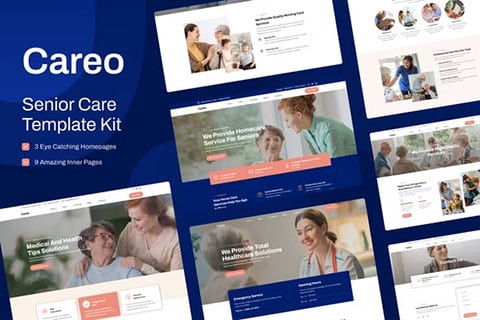
Features of Careo – Elderly & Senior Care Elementor Template Kit
- Use of free plugins.
- Header and footer builder.
- 6 templates for inner pages.
- 3 different templates for the home page.
- 100% responsive.
- Fully customizable.
- High browser compatibility: Chrome, Firefox, Safari, Opera.
This kit includes the following templates:
- Homepage (Home) 1.
- Homepage 2.
- Home page 3.
- About us.
- Why choose us.
- Our services.
- Frequently Asked Questions.
- Page 404.
- Contact.
Careo – Elderly & Senior Care Elementor Template Kit includes the following preinstalled plugins:
- Elementor
- ElementsKit Lite
- Elementor Header & Footer Builder
- MetForm
About Careo – Elderly & Senior Care Elementor Template Kit
The Elementor template kit Careo – Elderly & Senior Care Elementor Template Kit is a complete and easy-to-use solution for creating websites dedicated to elderly and senior care. Specifically designed for the Elementor plugin, This kit offers a variety of templates and elements that allow users to build professional and attractive web pages without the need for advanced knowledge in design or programming.
Main features of the template kit Careo – Elderly & Senior Care Elementor Template Kit
The template kit Careo – Elderly & Senior Care Elementor Template Kit It has a series of features that make it ideal for any website related to elderly care. Among the most outstanding characteristics are:
- Modern and professional design: The templates included in the kit feature a clean and professional design, ideal for conveying trust and seriousness in elderly care.
- Compatible with Elementor: Specifically designed for the popular page builder Elementor, this kit allows for easy customization and editing of each template.
- Variety of pre-designed pages: The kit includes a wide range of pre-designed pages, such as home pages, about us, services, testimonials, gallery, and contact.
- SEO optimized: The templates are designed with best SEO practices in mind, helping to improve your website’s ranking in search engines.
- Responsive and adaptable: All templates are fully responsive, ensuring that your website looks perfect on any device, whether it is a computer, tablet, or smartphone.
- Easy to use: With an intuitive and user-friendly interface, this template kit allows any user, regardless of skill level, to efficiently create and customize their website.
Pages included in the template kit Careo – Elderly & Senior Care Elementor Template Kit
The template kit Careo – Elderly & Senior Care Elementor Template Kit offers a variety of pre-designed pages that cover all the needs of a website dedicated to the care of elderly people. Below, some of the included pages are detailed:
- Home page: An attractive and well-structured home page that provides an overview of the services offered and highlights the key points of the company or institution.
- About us page: A page designed to present the company’s history, mission, vision, and values, as well as the team of professionals dedicated to elderly care.
- Services page: A detailed page that describes the different services offered, such as home care, medical attention, recreational activities, and more.
- Contact page: A page that includes a contact form, address, phone number, and links to social media to facilitate communication with visitors.
Advantages of using the template kit Careo – Elderly & Senior Care Elementor Template Kit
Using the template kit for Elementor Careo – Elderly & Senior Care Elementor Template Kit offers multiple advantages for those looking to create a professional and effective website for elderly care. Some of the main advantages include:
- Time and effort saving: By using pre-designed templates, users can save time and effort in creating and designing their website.
- Easy customization: Thanks to compatibility with Elementor, customizing each template is simple and straightforward, allowing quick adjustments and modifications.
- Professional quality: The templates are designed by professionals, which guarantees a high standard of quality in the design and functionality of the website.
- SEO improvement: SEO-optimized templates help improve the website’s visibility on search engines, attracting more visitors and potential clients.
Conclusion
The Elementor template kit Careo – Elderly & Senior Care Elementor Template Kit It is an indispensable tool for those looking to create a website dedicated to elderly care. With its professional design, easy customization, and a wide variety of pre-designed pages, this kit offers everything needed to build an attractive and functional website. Additionally, its SEO optimization and mobile device compatibility ensure an excellent user experience and better performance on search engines.