Elementor Pro License Activation Service

All the features of Elementor Pro: MCP features, WooCommerce widgets, theme builder, updates...

Our Elementor Pro website licenses include:

Compare the ESSENTIAL Plan with our EXPERT Plan

ESSENTIAL

Sold by Elementor with fewer features

$60

/year

Características

OUR EXPERT PLAN

Buy now and don't overpay

$10.99

/year

Características

What people think of the cheap elementor Pro

Frequently Asked Questions

As an agency, we purchase license bundles at a lower cost so that you can benefit from the savings.

If you have visited elementor.com, you will have seen that there are different types of licenses. Some include only 50 Pro Widgets, while others do not include Popups, Forms, or the special WooCommerce features…

Expert Licenses

Our license is the highest tier, the Expert license, which includes ALL features and widgets (all 107 widgets).

It also includes the template library, Theme Builder, display conditions for elements, dynamic tags, and more.

Once you have completed your purchase, a member of our team will contact you (or you can contact us) to activate your license or licenses and assist you if you have any questions.

Yes. To activate the license key on your website, we need to access its back office. However, you do not need to give us an administrator role; a Support role is sufficient.

We will explain everything to you once you complete your purchase.

It is a user who can make changes to plugins (for example, activate your Elementor Pro license) but cannot create or delete other users.

When creating a user with the Support role, you can also specify how long you want the account to remain active. Once that period has elapsed, the user will be deleted automatically.

With this type of user, your installation will remain fully protected.

Create secure access

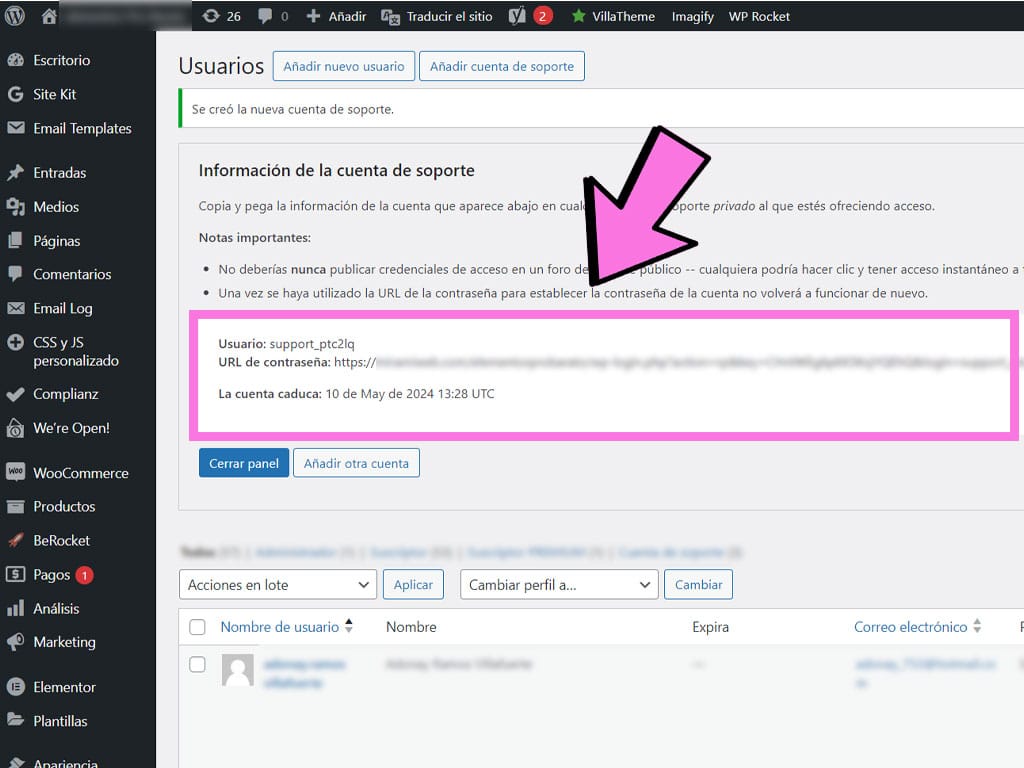
Creating a user role is very easy with the Support-Me plugin.

Simply install and activate the plugin, go to your user list, and you will see a button at the top for creating a temporary support account.

Save the login details because we will ask you for them.
It is completely understandable to have some concerns.

We only access your website to install the license… and nothing else.

Once the process is complete, you can delete the Support user you created or wait for it to be deleted automatically.

Just like you, we also need to rest at some point during the day, although we generally work during normal business hours.

If we receive your order during those hours, we will assist you straight away.

Remember that our time zone is (GMT+2).

If we are outside our business hours, we will contact you as soon as possible.

You can also contact us via WhatsApp or the contact form outside business hours, and we will do everything possible to keep your wait as short as possible.

No, you do not need to register on our website beforehand. However, an account will be created automatically when you complete the purchase process.

In your account, protected by a username and password, you will find important information, your payment methods, and the option to download the plugins you have purchased.

To activate your license, you must have an up-to-date wordpress.org installation, as well as up-to-date plugins and themes.

Your website must be hosted and connected to a public domain. We cannot install WordPress in a local test environment on your computer (such as XAMPP), although we CAN activate it on a staging environment or if you share the local installation over the internet.

One license per URL

Each license is linked to one URL, so it can only be used on one installation at a time.

Although it is not mandatory, it is HIGHLY RECOMMENDED.

Activating the license is a very simple process and does not involve any risk.

In addition, most hosting providers create daily backups.

Create a backup

For extra peace of mind, you can create your own backup using the “All-in-One WP Migration” plugin and download it to your computer.

When you purchase any license from our website, we will give you the Pro version of the plugin so that you can easily restore that backup.

When you purchase our service, you are purchasing the activation of a license on your website. This service renews automatically.

A payment will be charged automatically every year on the same day and month.

Of course. You can cancel it at any time, without having to provide any explanation, to prevent future renewals.

You may have previously installed a version of Elementor Pro that is out of date or that you downloaded from an unreliable source.

When you purchase any of our products, you will be able to download the original Elementor Pro plugin .zip file from your account area.

Install Elementor Pro securely

We recommend reinstalling the plugin we provide, which comes directly from the developer (without patches or modifications).

This is the only way we can ensure that the installation has been built on a reliable foundation.

Yes. Each license includes one free reactivation in addition to the initial activation.

You can use it, for example, to move your website from a staging site to its permanent domain, migrate your website, or change its URL. If you need another reactivation after using the free one, you’ll need to purchase the reactivation service.