Inkcraft – Elementor Pro template kit for blogs and magazines

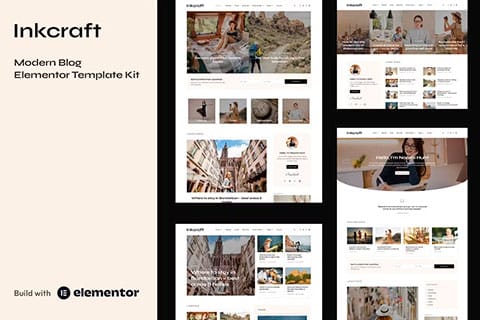
Inkcraft is an Elementor template kit for blogs and magazines of the latest generation specifically designed for bloggers, creators, authors, editors, and creatives. This template kit contains more than 55 ready-to-use templates and blocks.

Inkcraft template features:

  • 9 homepage layouts.
  • More than 25 page templates.
  • More than 28 blocks: mix and match them to create new designs
  • Global styles included.
  • SEO-friendly design.
  • No coding knowledge required.
  • Header and footer builder.

Included page templates:

  • Home 1
  • Home 2
  • Home 3
  • Home 4
  • Home 5
  • Home 6
  • Home 7
  • Home 8
  • Home 9
  • Category layout 1
  • Category layout 2
  • Single blog post 1
  • Single blog post 2
  • Single blog post 3
  • Single blog post 4
  • Author archive
  • Another file
  • Blog archive
  • About me
  • Contact me
  • Search results
  • Photographic stories
  • Single photo story
  • Testimonials
  • Page 404
  • Coming soon

Included block templates:

  • Sidebar: single post and archive
  • Sidebar: with author box
  • Sidebar: without author box
  • Heading
  • Footer
  • Post slider 1
  • Post slider 2
  • Post slider 3
  • Post slider 4
  • Hero banner 1
  • Hero banner 2
  • Post grid 1
  • Posts Grid 2
  • Posts Grid 3
  • Posts Grid 4
  • Posts Grid 5
  • Posts Grid 6
  • Posts Grid 7
  • Posts Grid 8
  • Category Posts Box 1
  • Category Posts Box 2
  • Category Posts Box 3
  • Category Posts Box 4
  • Category Posts Box 5
  • Category Posts Box 6
  • Page Title
  • Contact Form
  • Newsletter Popup
  • Subscription Newsletter
  • Category Boxes

Add-ons installed with the kit:

  • Elementor
  • Qi Addons
Inkcraft – Elementor Pro template kit for blogs and magazines is distributed under the GPL license. All resources have been developed by third-party programmers. cheapelementorpro.com is not affiliated with or related to any of them.

Share on your social media

Facebook
Twitter
LinkedIn
Pinterest
WhatsApp

How to install the templates

How to use the template kits (quick guide)

Please note that www.cheapelementorpro.com does not provide support for the installation or configuration of the template kits.

  1. Download the kit file using the Download the Kit for Free Now button on this page and do not unzip it.
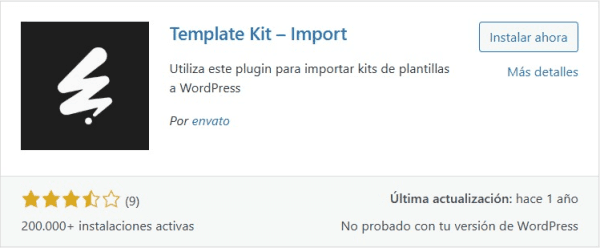
  2. From the WordPress plugin repository, install and activate the “Template Kit – Import” plugin on your website.
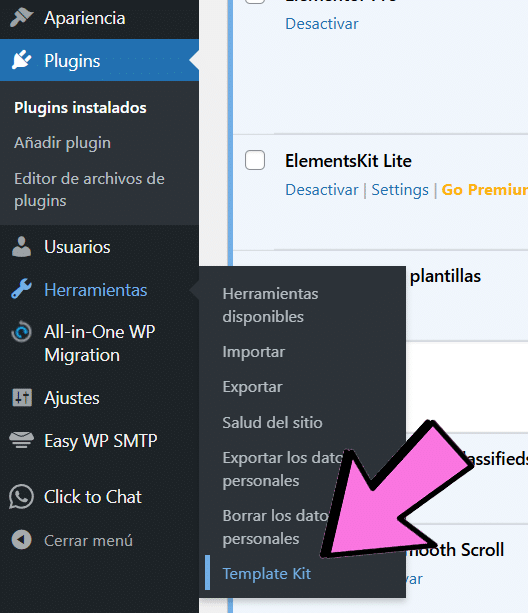
  3. Go to Tools > “Template Kit” and click the “Upload Template Kit ZIP File” link.
  4. Click Import on the Global Kit Styles.
  5. Click Import on the content you want to use, one template at a time. It will be stored in Elementor under Templates > Saved Templates.
  6. Go to Pages, create a new page and click Edit with Elementor.
  7. Click the settings icon to open the page settings and select Elementor Full Width to hide the page title and display the page correctly.
  8. Add a container and click the folder icon to access the My Templates tab. Then import the page or section you want to customize.
  9. If you have Elementor Pro, headers, footers, Blog pages and Shop pages can be customized using the “Theme Builder”. In some template kits, they are activated automatically. In others, you must specify the display conditions—for example: Header > Condition: Entire Site.


Detailed guide:

Blog posts:

Blog content is not included. You will need to add some posts to WordPress before post content appears in the templates.

Can’t find the Envato Elements plugin in the repository?

You need to search for:

“envato template kit – import“

To access the section where you need to upload the template kit:

Over 70 free template kits

Download "Inkcraft – Elementor Pro template kit for blogs and magazines" for free when you order an Elementor Pro license

License activated on your WP installation MCP features All 86 Widgets included Dynamic functions Design tools for WooCommerce Popups