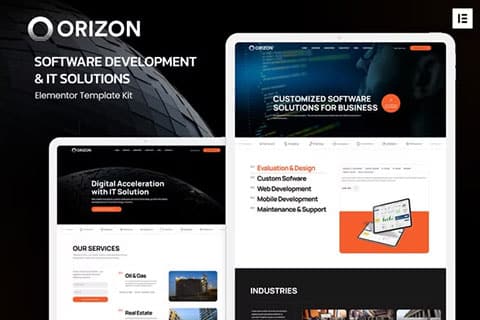
It is fully responsive and is prepared for Retina screens, and its design is focused on agencies and professionals in software development, mobile applications, programming, web design, application testing, and other related businesses.
Orizon – Software Development & IT Solutions Elementor Template Kit includes 20+ carefully designed templates that will allow you to create a complete and customized professional website very easily with just a few clicks.
Features of Orizon – Software Development & IT Solutions Elementor Template Kit
- Clean and modern design.
- 20+ ready-to-use templates.
- Use of only free plugins.
- Fully responsive.
- Retina-ready.
- Fully customizable.
- High browser compatibility: Chrome, Firefox, Safari, Opera.
This kit includes the following templates:
- Global styles.
- Homepage (Home).
- Services.
- Service detail.
- Industry.
- Industry detail.
- Case studies.
- Case study detail.
- Pricing.
- Testimonials.
- Team.
- Frequently Asked Questions.
- Page 404.
- About.
- Contact.
- Header (Header).
- Footer (Footer).
Orizon – Software Development & IT Solutions Elementor Template Kit includes the following preinstalled plugins:
- Elementor
- ElementsKit Lite
- MetForm
- Jeg Elementor Kit
About Orizon – Software Development & IT Solutions Elementor Template Kit
The Elementor template kit Orizon – Software Development & IT Solutions Elementor Template Kit is a comprehensive solution designed for professionals and companies in the field of software development and IT solutions. This kit offers a variety of modern and highly customizable templates that make it easy to create attractive and functional websites using the popular page builder Elementor.
Main features of the kit Orizon – Software Development & IT Solutions Elementor Template Kit
The kit Orizon – Software Development & IT Solutions Elementor Template Kit stands out for its multiple functionalities that allow users to create professional web pages without the need for advanced programming knowledge. Among its most notable features are:
- Modern and professional design: Each template in the kit is designed with a modern and professional approach, ideal for software development companies and IT solutions.
- Compatibility with Elementor: All templates are specifically designed to work with Elementor, ensuring seamless integration and a smooth editing experience.
- Complete page templates: Includes templates for home pages, services, about us, contact, and more, making it easy to create a complete and coherent website.
- Custom elements: Offers a variety of custom elements that can be easily dragged and dropped into the design, allowing full customization.
- SEO optimization: The templates are optimized for SEO, helping to improve search engine rankings and increase online visibility.
- Responsive and retina-ready: All designs are fully responsive and ready for retina screens, ensuring that the website looks flawless on any device.
- Easy customization: Thanks to Elementor’s intuitive interface, customizing colors, fonts, images, and other visual elements is extremely simple and quick.
Templates included in the kit Orizon – Software Development & IT Solutions Elementor Template Kit
The kit Orizon – Software Development & IT Solutions Elementor Template Kit includes a selection of pre-designed templates that cover all the needs of a software development and IT solutions website. Some of the most important templates are:
- Home page: An attractive and dynamic design that captures visitors’ attention from the very first moment.
- Services page: Specific templates to detail the services offered, with sections dedicated to features, benefits, and case studies.
- About us page: A design that allows presenting the company’s history, the team, and corporate values professionally.
- Contact page: Templates with integrated contact forms, maps, and all the necessary information for potential clients to get in touch easily.
Benefits of using the template kit Orizon – Software Development & IT Solutions Elementor Template Kit
Using the template kit for Elementor Orizon – Software Development & IT Solutions Elementor Template Kit offers multiple benefits for developers and IT sector companies. Some of the key benefits include:
- Reduction of development time: With pre-designed templates, users can significantly reduce the time needed to build a complete website.
- Effortless professionalism: The templates are designed by professionals, ensuring a polished and consistent look throughout the website.
- Flexibility and customization: Compatibility with Elementor allows full customization, adapting each template to the specific needs of the project.
- Improvement of the user experience: Responsive designs ensure that the website looks and functions perfectly on any device, enhancing the end user’s experience.
- Optimization: The templates are optimized for SEO and performance, helping to improve online visibility and website loading speed.